
Every so often I feel compelled to write about a service or product I’ve come across. Sometimes because it’s really bad, but sometimes because it’s really good, and this time it’s the latter.
I’ve recently started working with a client helping build and launch their Shopify site. You can read more about my Shopify services, but this post is about some of the wider support I provided during the launch.
The Shopify site was part of a full brand launch for Concept Padel, including a new range of premium padel clothing. This is where OpenLabelMaker comes in. The range had no barcodes and, in fact, no product labels of any description.
Before I get into that, it’s worth explaining why barcodes are one of those topics that immediately get my attention.
Anyone who knows me knows that barcodes give me nightmares. That’s a slight exaggeration, but only just.
I’ll take you back a few years. During my time at Clothingsites, an online menswear retailer, I was heavily involved in a major digital transformation project following private equity investment in the business. A key part of that project was selecting and implementing a warehouse management system called Peoplevox.
For the warehouse management system to function properly, every product needed a unique barcode. That meant working through thousands of SKUs, determining EANs across the product catalogue and then undertaking the long, tedious process of physically labelling stock where barcodes didn’t already exist.
It was one of those jobs that sounds straightforward until you’re responsible for delivering it. The reality involved spreadsheets, product audits, endless rolls of labels and more hours spent wrestling with Zebra printers than I care to remember. If I never saw another Zebra printer again, I’d have been perfectly happy.
Years later, when I found myself helping launch Concept Padel and realised we had a product range with no barcodes or labels, I immediately had flashbacks to those earlier projects.
Thankfully, things have moved on considerably since then.
Had OpenLabelMaker existed in my toolkit back then, it would have saved a significant amount of time and frustration.
Why Barcodes Matter More Than Most People Realise
So when we started working through the operational setup for Concept Padel, solving the barcode and labelling problem became an early priority. Not just from a logistics perspective, but from a retail readiness point of view too.
If you’re selling physical products, especially through Shopify and into broader retail channels, barcodes and properly structured labels aren’t optional extras. They’re fundamental infrastructure.
Without them, inventory management becomes harder, fulfilment becomes more prone to error and future expansion into wholesale channels becomes significantly more complicated.
This is where OpenLabelMaker came into play.
We needed a way to quickly generate barcodes, design product labels and produce print-ready files without adding unnecessary complexity to the process. In the middle of a brand launch, there is always too much going on already. The last thing you want is to get bogged down in overly technical software or convoluted workflows just to get basic product labelling in place.
How I Found OpenLabelMaker
When I first started thinking about the barcode requirements for Concept Padel, my instinct was to do what I had always done.
The plan was simple: install Zebra Designer, create a label template and start printing.
Unfortunately, it didn’t take long to realise that wasn’t really a complete solution. Creating the template was only half the problem. You still need a mechanism to get the data into the labels, whether that’s through another system, an integration, a spreadsheet process or custom software.
I found myself heading down the same path I’d seen so many times before: creating templates in one place, maintaining data in another and somehow trying to stitch everything together.
At that point I started searching for alternatives.
OpenLabelMaker was actually one of the first tools I found. Unfortunately, I initially hit a bug that stopped me progressing, so I continued looking around to see what else was available.
There were alternatives. Some handled design reasonably well. Others focused on barcode generation. A few had decent template systems.
What I found was that most of them were good at one thing but compromised elsewhere.
Some lacked bulk data import capabilities. Others didn’t support image uploads, which ruled out branded labels. Some were tied to specific printer ecosystems. Others required software installation or account creation before you could even determine whether they would do the job.
The more I looked around, the more I found myself comparing everything back to OpenLabelMaker.
Why I Chose OpenLabelMaker
The biggest reason was simply that it solved the whole problem rather than part of it.
It wasn’t just a barcode generator. It wasn’t just a label designer. It wasn’t just a printer utility.
It combined everything into a single browser-based workflow that worked regardless of which printer the client happened to own.
That printer independence was a major plus for me. I’ve spent enough time around warehouse systems, thermal printers and labelling projects to know that hardware changes. Businesses upgrade equipment. Teams use different printers. Requirements evolve.
Building a process around a specific printer ecosystem often creates unnecessary headaches later.
The other feature that immediately stood out was the ability to connect labels directly to a Google Sheet.
For Concept Padel, that was a much better solution than managing an offline spreadsheet and repeatedly exporting and importing data every time a new product was added.
Instead, we could establish a simple process where the team updates a Google Sheet and generates a fresh export whenever new products are introduced.
Simple processes tend to survive. Complicated processes tend to be abandoned.
This felt like the former.
The Process I Used
The first step was exporting the product catalogue from Shopify.
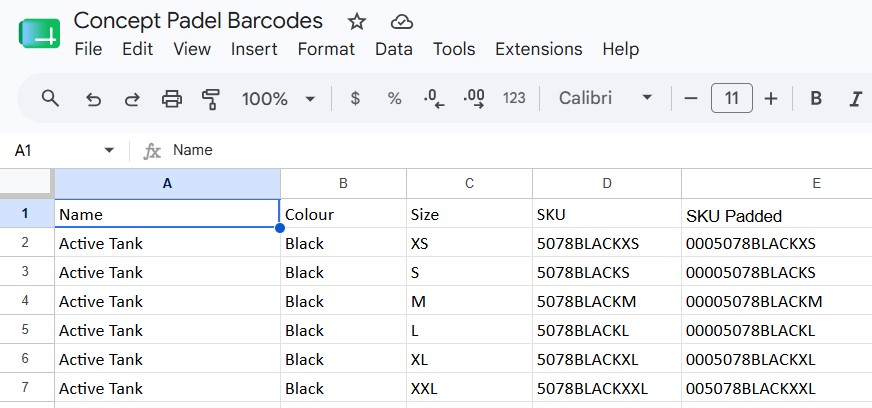
This gave me the information I needed for each product, including SKU, style name, colour and size.
For the barcode itself, I generated a Code 128 barcode using the SKU as the source value. To keep everything visually consistent, I padded the SKU values to 14 characters so the resulting barcodes would all occupy the same space on the label.
Longer term, we’ll likely obtain a GS1 account and move to proper EAN barcodes. That will become increasingly important as Concept Padel expands into wholesale channels and potentially Google Shopping as part of its direct-to-consumer strategy.
Once the data was prepared, I uploaded it into a publicly accessible Google Sheet.
I then created a new template within OpenLabelMaker using a Zebra 2×4 inch label format. I knew the client already owned a Zebra printer, and the 2×4 format provided enough flexibility to be used both on swing tickets and product packaging.
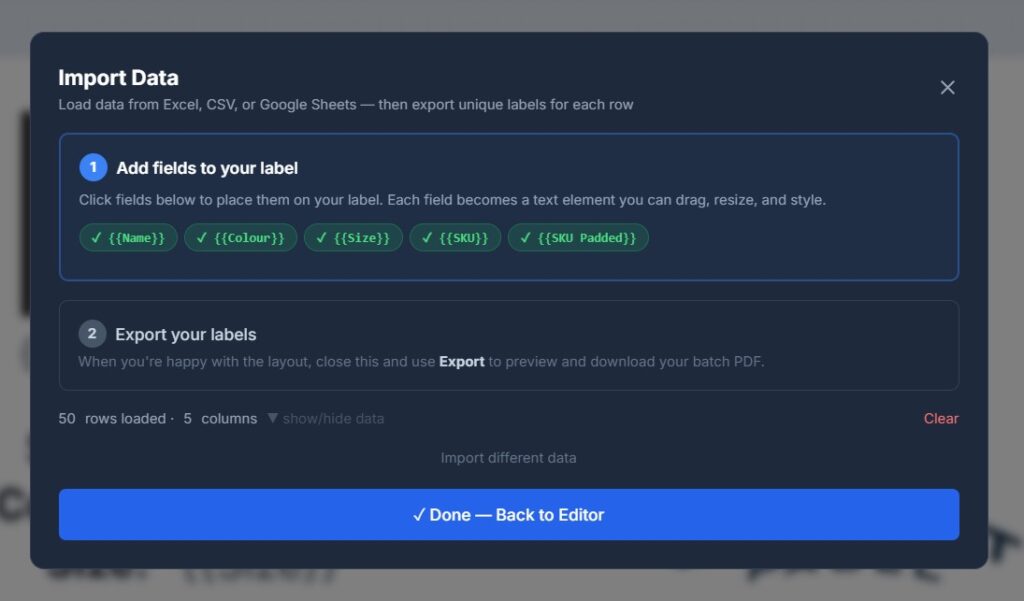
The Google Sheet was then linked to the template using OpenLabelMaker’s data import functionality.
This is where things started to get particularly useful.
The columns from the spreadsheet automatically became available as fields within the label designer, allowing me to build a dynamic template rather than manually creating labels one at a time.
The final label included:
- Barcode
- SKU
- Product style
- Colour
- Size
- Brand logo
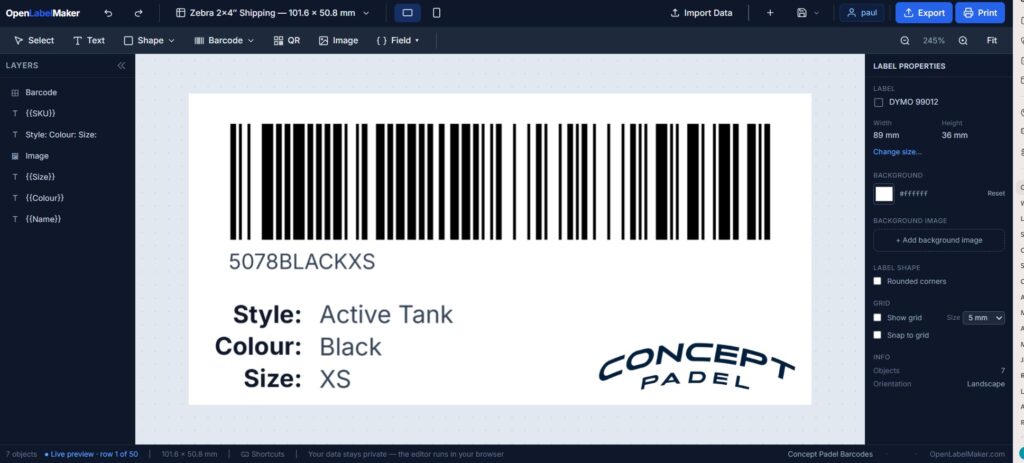
The editor made this straightforward to assemble, supporting text, shapes, images, barcodes, QR codes and data-driven fields.
Once the template was complete, I generated a batch export.
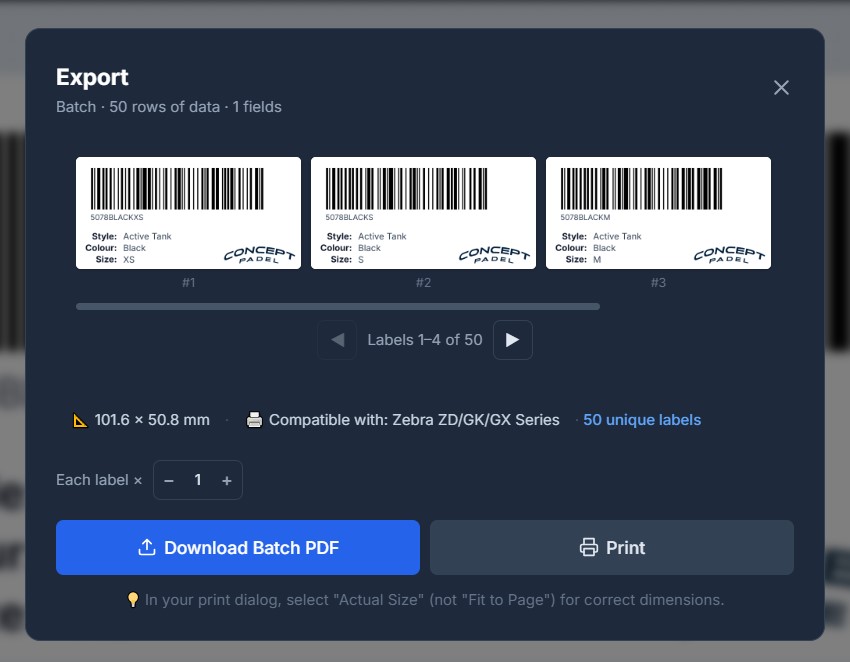
Rather than printing labels for every unit of stock immediately, we chose a more flexible approach. Each SKU was represented once within the exported PDF, allowing the team to print labels on demand as required.
That flexibility suited the business better than pre-printing thousands of labels.
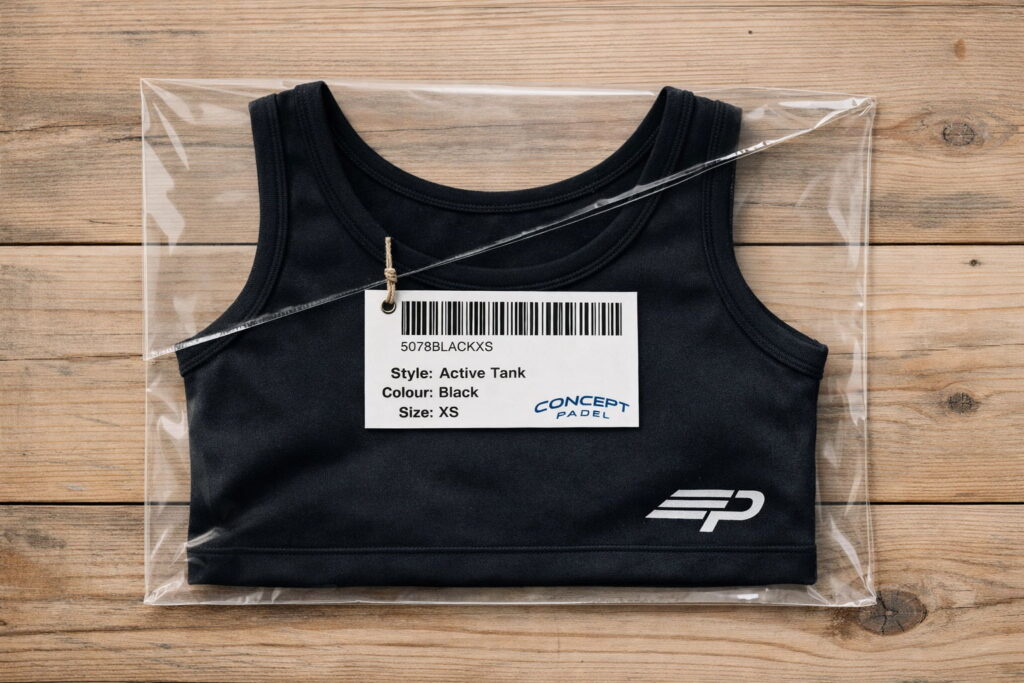
That said, it would have been equally easy to populate the spreadsheet with inventory quantities and generate labels for every individual item if that had been the preferred workflow.
The important thing was that the process was now repeatable, scalable and easy for the client to maintain themselves.
And perhaps most importantly, it took me away from the traditional cycle of juggling spreadsheets, printer software and multiple disconnected systems.
It replaced my old way of thinking remarkably quickly.
What OpenLabelMaker Actually Does Well
One thing I appreciated about OpenLabelMaker is that it focuses on solving a real business problem rather than trying to become an all-in-one platform.
At its core, it’s a browser-based label design and barcode generation tool that works across virtually any printer setup.
Whether you’re using a Zebra printer, a DYMO LabelWriter, a Brother QL printer, a Rollo printer or simply printing onto Avery sheets using a standard office printer, the workflow remains largely the same.
The editor itself is simple but capable. Labels can include:
- Text
- Shapes
- Images and logos
- Barcodes
- QR codes
- Dynamic data fields
The platform supports common barcode formats including Code 128, EAN-13, UPC-A, Code 39 and QR codes, making it suitable for everything from inventory control through to retail product labelling.
Another feature I liked was the fact that everything runs in the browser. There is no software installation, no account requirement (you can create an account and save your templates if you want to though) and no dependency on a particular operating system.
After years of installing printer drivers, label software and various middleware applications, that simplicity is refreshing.
The ability to export clean, print-ready PDFs at exact label dimensions is also more important than it sounds. Barcode labels only work if they print accurately, and OpenLabelMaker removes much of the trial and error that often comes with label design.
Most importantly, the entire platform feels designed by someone who understands the actual problem users are trying to solve.
That’s surprisingly rare.
The Bug I Hit (And Why It Actually Increased My Confidence)
It wouldn’t be a genuine review if I pretended everything worked perfectly from the start.
As I mentioned earlier, when I first discovered OpenLabelMaker, I ran into a bug that stopped me progressing with the project. At the time, I wasn’t entirely sure whether it was something I was doing wrong or an issue with the platform itself.
My initial reaction was probably the same as most people’s: close the tab and start looking for alternatives.
That’s exactly what I did.
The interesting thing was that after spending time evaluating other solutions, I kept finding myself comparing them back to OpenLabelMaker. While some alternatives had individual strengths, none seemed to offer the same combination of flexibility, bulk data handling, branding support and printer independence.
So I decided to report the issue.
What happened next was genuinely impressive.
The response was quick, the communication was clear and, most importantly, the issue was fixed rapidly.
As someone who has spent years working with ecommerce platforms, warehouse systems and software vendors, I’ve learned that bugs aren’t the thing that should worry you.
Every platform has bugs.
What matters is how the people behind the product respond when those bugs are identified.
In this case, the support experience gave me confidence that OpenLabelMaker isn’t just a useful tool, but one that is actively maintained and improved.
Ironically, the bug that initially sent me looking elsewhere ended up reinforcing my decision to use it.
Things I’d Like To See Improved
No product is perfect, and there is one area where I think OpenLabelMaker could potentially be improved.
When you’re working with dynamic data fields that contain values of varying lengths, it can sometimes be difficult to achieve perfectly centred layouts.
For example, a short product name and a longer product name will naturally occupy different amounts of space, and there were occasions where I found myself making design decisions to accommodate that variability.
To be clear, this wasn’t a major issue and certainly wasn’t enough to impact the outcome of the project.
In practice, I simply adjusted the label design to work around it and achieved a result I was happy with.
However, if there were more advanced alignment options for variable-length data fields in future versions, that would be a welcome addition.
That said, this is a relatively minor observation in the context of what is otherwise an extremely capable tool.
Final Verdict
OpenLabelMaker solved a real-world business problem for me.
It allowed me to take product data directly from Shopify, generate barcodes, create branded labels, connect everything to a Google Sheet and establish a process that the client can continue using long after the initial launch project has been completed.
More importantly, it did so without requiring specialist software, expensive licences or hours spent wrestling with printer-specific applications.
As someone who has spent far too much of his career dealing with inventory systems, barcode projects and label printing workflows, I don’t make recommendations lightly.
OpenLabelMaker genuinely impressed me.
It combines the flexibility of a professional label design tool with the simplicity that most small and growing businesses actually need.
Would I use it again?
Absolutely.
Would I recommend it?
Without hesitation.
Rating: 9/10
The only reason it doesn’t receive a perfect score is the occasional challenge around centring variable-length data fields. Everything else – the feature set, printer compatibility, data integration, ease of use and support experience – exceeded my expectations.
If you’re looking for a simple way to create product labels, inventory labels, shipping labels or barcode labels without locking yourself into a particular printer ecosystem, I highly recommend giving OpenLabelMaker a try.
You can learn more and start designing labels here: